
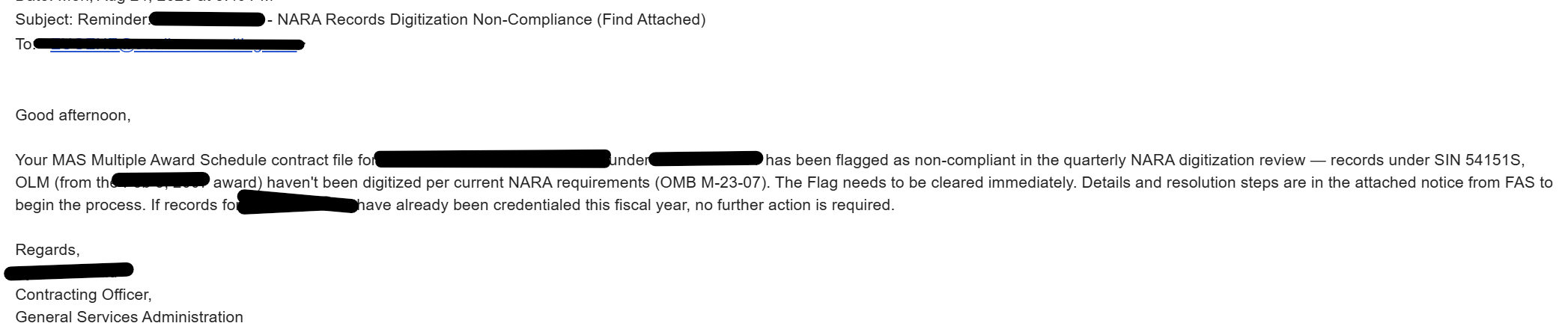
Picture this: an email lands in your inbox. It has your actual Contracting Officer's name on it, a convincing GSA-style signature block, and a deadline that makes your stomach drop. It looks completely legitimate.
It's also completely fake.
GSA Multiple Award Schedule contractors are currently being targeted by an active phishing campaign that impersonates GSA contracting personnel. The GSA Office of Inspector General has issued a formal alert confirming that scammers are going after MAS contractors and entities registered in SAM.gov, in some cases using real officials' names, titles, and signature formatting to make the messages look authentic.
How the Scam Works
The fraudulent messages typically lean on one of two fabricated compliance problems:
- A vendor credentialing fee. The email claims an annual fee is due to keep the company's status "active," often paired with a credit-card authorization form.
- A records-digitization deficiency. The email claims the contractor's GSA file has been flagged for "records digitization non-compliance," invoking NARA, OMB Memorandum M-23-07, or federal electronic-records rules, and directs the recipient to an attachment or link for "resolution steps."
Some versions raise the stakes further, warning that an administrative hold could delay modifications, task orders, or an option-period exercise unless a one-time payment is made. That urgency is the point. It's designed to get you to act before you stop and think.
What makes this scam more convincing than the average phishing attempt is that it borrows real federal terminology. Federal electronic-records policy and NARA digitization standards genuinely exist. The scammers are simply misrepresenting them as a contractor-wide GSA "credentialing" program with a fee attached, which no such program is.
Warning Signs to Watch For
The single most reliable check is the sender's actual email domain, not the name or title displayed. Scammers frequently use look-alike domains designed to resemble GSA's official gsa.gov address. A correct name, an accurate job title, an agency logo, or a polished signature block proves nothing on its own.
Be especially cautious of any unsolicited message that:
- Demands a credentialing, processing, compliance, registration, or digitization fee
- Claims your contract is at risk of suspension, administrative hold, delayed task orders or modifications, or a missed option exercise
- Includes an attachment, payment form, invoice, QR code, or link to an external "processing portal"
- Pressures you to act quickly or pay by credit card
- Directs you to a phone number, reply-to address, or website supplied only within the message itself
- Cites a real GSA official but arrives from anything other than a verified gsa.gov address
If a message checks even one or two of these boxes, treat it as suspicious until proven otherwise. Do not open unsolicited attachments or provide payment-card, banking, login, or other sensitive information in response to an unverified message, even if it appears to come from a contracting official you know.
GSA Does Not Act This Way
GSA will never email a Schedule contractor asking for a credentialing or records-digitization fee. Full stop. The one recurring financial obligation tied to MAS sales is the Industrial Funding Fee, and that is reported and remitted through the official GSA sales-reporting process, never through an emailed invoice, an unsolicited payment link, or a credit-card authorization form.
If a message references a new fee, a compliance deficiency, or a contract deadline, don't rely on any contact information the message itself provides. Verify it independently first.
What to Do If You Receive One
- Don't engage. No clicking links, opening attachments, replying, or sharing payment or company information.
- Check the full sender address, not just the display name. Look closely at the domain.
- Contact your actual Contracting Officer or Contract Specialist using information already on file or from a verified GSA source, never the contact details in the suspicious email.
- Preserve the evidence. Save the email, any attachments, and full headers if possible.
- Loop in your IT or security team, especially if anyone clicked a link, opened an attachment, or entered credentials.
- Report it to the GSA Office of Inspector General and the FBI Internet Crime Complaint Center (IC3).
The Bigger Picture
Vigilance against impersonation scams isn't a separate task from managing your Schedule contract well. It's part of the same discipline: verify unexpected requests independently, keep clear internal procedures for handling GSA communications, and never let an urgent payment demand override basic due diligence. A convincing signature block is easy to fake. A quick call to your actual point of contact at GSA is not.